


Hello Logan,
Thank you for reaching out with your question regarding insecure guest logins in Windows 11 24H2.
Background:
Microsoft has been progressively increasing the security measures in Windows, and disabling insecure guest logins is one of those steps. Insecure guest logins can pose a significant security risk because they allow access to network shares without requiring a username or password. This change aligns with the security enhancements seen in Windows Enterprise editions.
Your Situation:
After updating to Windows 11 24H2, you found that connecting to network shares without requiring a login (everyone access, password protected sharing turned off) no longer works. Shares with a password and those configured in group policy to allow insecure guest logins function correctly.
Explanation:
Based on the behavior you described, it seems Microsoft is indeed defaulting insecure guest logins to disabled in Windows 11 24H2. This change would enhance security by preventing anonymous access to network shares.
Steps to Address the Issue:
1. Enable Insecure Guest Logins via Group Policy:
- Press **Win + R**, type
gpedit.msc, and press Enter to open the Group Policy Editor. - Navigate to **Computer Configuration** > **Administrative Templates** > **Network** > **Lanman Workstation**.
- Double-click **Enable insecure guest logons** and set it to **Enabled**.
- Apply the changes and restart your computer.
2. Enable Insecure Guest Logins via Registry Editor:
- Press **Win + R**, type
regedit, and press Enter to open the Registry Editor. - Navigate to
HKEY_LOCAL_MACHINE\SYSTEM\CurrentControlSet\Services\LanmanWorkstation\Parameters.
- If the
AllowInsecureGuestAuthentry does not exist, right-click and select **New** > **DWORD (32-bit) Value**, and name itAllowInsecureGuestAuth. - Set the value of
AllowInsecureGuestAuthto1. - Close the Registry Editor and restart your computer.
3. Consider Alternative Security Measures:
- Instead of enabling insecure guest logins, consider setting up password-protected sharing for better security.
- Ensure that all users have appropriate permissions to access the necessary shares.
Best regards,
Rosy
Hello Logan,
Thank you for reaching out with your question regarding insecure guest logins in Windows 11 24H2.
Background:
Microsoft has been progressively increasing the security measures in Windows, and disabling insecure guest logins is one of those steps. Insecure guest logins can pose a significant security risk because they allow access to network shares without requiring a username or password. This change aligns with the security enhancements seen in Windows Enterprise editions.
Your Situation:
After updating to Windows 11 24H2, you found that connecting to network shares without requiring a login (everyone access, password protected sharing turned off) no longer works. Shares with a password and those configured in group policy to allow insecure guest logins function correctly.
Explanation:
Based on the behavior you described, it seems Microsoft is indeed defaulting insecure guest logins to disabled in Windows 11 24H2. This change would enhance security by preventing anonymous access to network shares.
Steps to Address the Issue:
1. Enable Insecure Guest Logins via Group Policy:
- Press **Win + R**, type
gpedit.msc, and press Enter to open the Group Policy Editor. - Navigate to **Computer Configuration** > **Administrative Templates** > **Network** > **Lanman Workstation**.
- Double-click **Enable insecure guest logons** and set it to **Enabled**.
- Apply the changes and restart your computer.
2. Enable Insecure Guest Logins via Registry Editor:
- Press **Win + R**, type
regedit, and press Enter to open the Registry Editor. - Navigate to
HKEY_LOCAL_MACHINE\SYSTEM\CurrentControlSet\Services\LanmanWorkstation\Parameters.
- If the
AllowInsecureGuestAuthentry does not exist, right-click and select **New** > **DWORD (32-bit) Value**, and name itAllowInsecureGuestAuth. - Set the value of
AllowInsecureGuestAuthto1. - Close the Registry Editor and restart your computer.
3. Consider Alternative Security Measures:
- Instead of enabling insecure guest logins, consider setting up password-protected sharing for better security.
- Ensure that all users have appropriate permissions to access the necessary shares.
Best regards,
Rosy
In admin PowerShell type in:
Set-SmbClientConfiguration -RequireSecuritySignature $false
It is the SMB sign in that is on by default on 24H2.
Check here: https://techcommunity.microsoft.com/t5/storage-at-microsoft/smb-signing-required-by-default-in-windows-insider/ba-p/3831704
You can’t access this shared folder because your organization’s security policies block unauthenticated guest access
You can't access this shared folder because your organization's security policies block unauthenticated guest access.
Windows 10 version 2004 - Organizations security policies block unauthenticated guest access
Confusion regarding AllowInsecureGuestAuth registry key and event 31018 - Windows 10 Support
Hi ,
If your company disable the GPO editor and Secpol on our PC, could you enable insecure guest logons with Registry?
Please refer to the following steps:
1.Open Run command by Pressing windows + R and type regedit and hit enter to open the registry editor.
2.Navigate to the following path.
Computer\HKEY_LOCAL_MACHINE\SOFTWARE\Policies\Microsoft\Windows
3.Expand the Windows Registry Key and search for LanmanWorkstation registry key, If you are not able to find the registry key, then you need to create it.
4.Right Click on the Windows Registry Key and Choose New > Key, Name the Key as LanmanWorkstation. Now Click on the LanmanWorkstation Registry key and from your right-hand side right click and choose New > DWORD 32 bit Value and name it as AllowInsecureGuestAuth. Double click on the AllowInsecureGuestAuth DWORD and set the vlaue to 1 and give OK.
As the picture below:
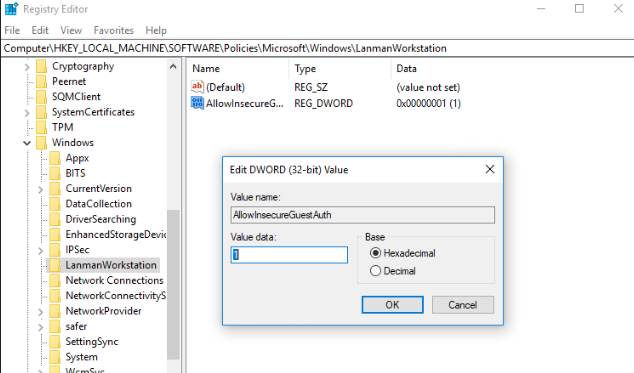
Now restart the system once and check the shared file is accessible or not.
Please note: Make sure that you back up the registry before you modify it. Make sure that you know how to restore the registry if a problem occurs.
---Please Accept as answer if the reply is helpful---
Best Regards,
Candy
I just had this same problem and struggled to get it resolved. Trying the phone number as a user name did not work for me unfortunately. What I ended up using was GUEST as the user name and left the password blank, finally worked. Why on earth I couldn't access with the computer's microsoft credentials is beyond me.
Already tried:
Local Group Policy -> Computer Configuration -> Administrative Templates -> Network -> Lanman Workstation -> Enable insecure guest logons.
HKEY_LOCAL_MACHINE\SYSTEM\CurrentControlSet\Services\LanmanWorkstation\Parameters] "AllowInsecureGuestAuth"=dword:1
Using Windows 11.
Within the latest “Windows 10 Fall Creators Update” the Guest access in SMB2 is disabled by default.
You can change this setting within your group policy settings.
Right click the Windows Icon at the bottom left of the task bar, or select the windows key + r
Within the run box, type “gpedit.msc”
Within the local Group Policy Editor, select “Administrative Templates”
Select “Network”
Select ”Lanman Workstation”
Double click “Enable Insecure guest logons” option
Tick the “Enable” option
Select OK
If this did not work consider checking this registry key too:
HKEY_LOCAL_MACHINE\SYSTEM\CurrentControlSet\Services\LanmanWorkstation\Parameters\AllowInsecureGuestAuth
It should be set to 1 for your case. (Credits: zhqiat)
Note: By enabling insecure guest logons, this setting reduces the security of Windows clients. https://support.microsoft.com/en-us/help/4046019/guest-access-smb2-disabled-by-default-in-windows-10-server-2016
One additional thing to look into.
If you apply the gpedit.msc solution as qore5 has mentioned and it still does not work, you may need to edit a separate registry key.
HKEY_LOCAL_MACHINE\SYSTEM\CurrentControlSet\Services\LanmanWorkstation\Parameters
and change AllowInsecureGuestAuth to 1.
This has happened after several Windows 10 updates.